
ChatGPT Video: AI Maker
ClawdiSocial
0.00.00 Reviews
- Version
- 1.1.5
- Installs
- 10.00K
- Age Rating
- Everyone
Screenshots
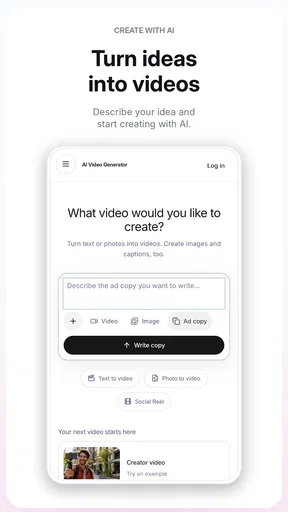
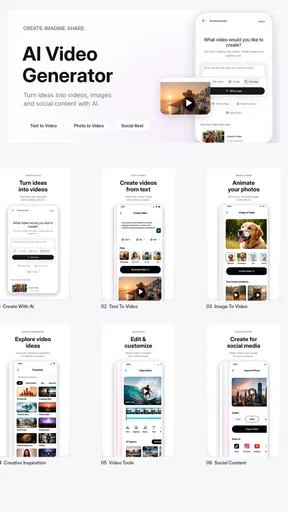
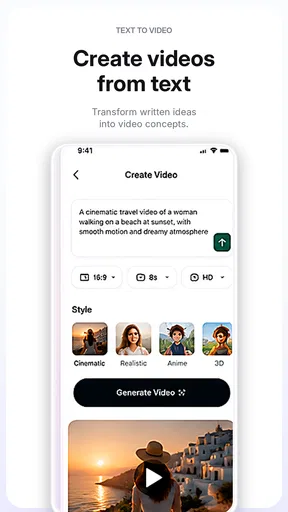
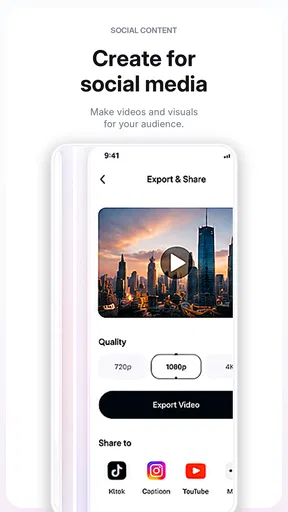
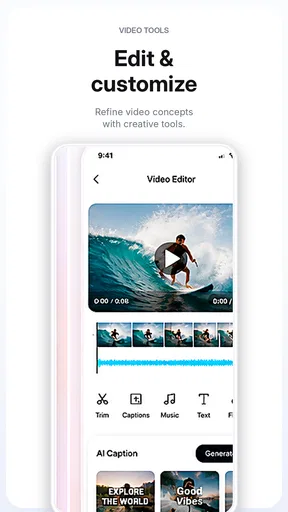
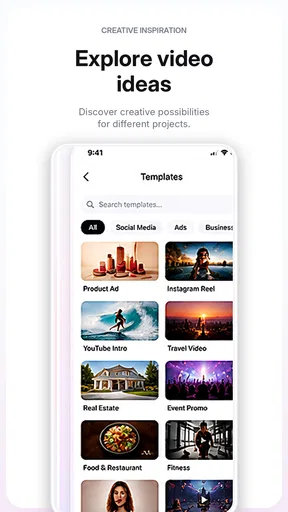
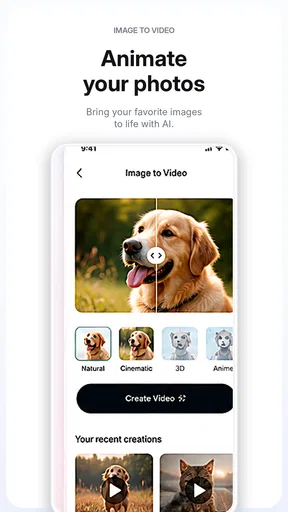
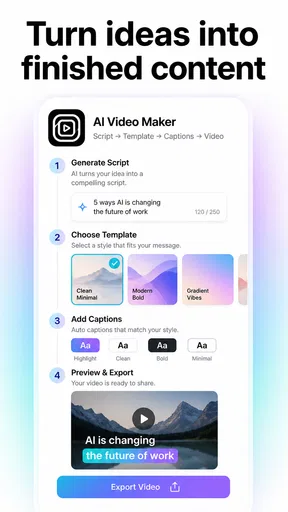
Our Review of ChatGPT Video: AI Maker
 Analysis by Appyee
I approached ChatGPT Video: AI Maker as a practical social-content tool rather than a simple video toy. Its promise is appealing: turn an idea into a video, a post, or an advertising concept through an AI-focused workspace. In my experience, that makes the app most interesting when I already know what I want to communicate but do not want to build every piece from scratch.
The app comes from Clawdi and sits in the social category. It is free to install, aimed at Everyone, and supports devices running Android 7.0 or later. The current release is version 1.1.5, while the app has passed the 10K-install mark. Those details make it accessible to a broad audience, although the presence of in-app purchases priced from $38.99 to $389.99 per item means I would approach the free entry point carefully before using it for a serious campaign.
From a rough idea to a usable social campaign
I find the move from a rough idea to a usable campaign most convincing when I treat the app as a drafting partner, not a publishing shortcut. A useful next step is to keep a brief of approved facts beside the creative prompt, so revisions can explore different angles without quietly changing the offer or its details.
Starting with the problem, not the template
The best way to use this app is to begin with a communication problem. For example, imagine I run a small bakery and want to promote a weekend cake collection. I might have a few product photos, a short description, and a target audience in mind, but no finished script, video sequence, caption, or advertising angle.
That is where the app’s “ChatGPT Video” identity becomes useful. Instead of opening a conventional video editor and staring at an empty timeline, I can start by describing the outcome I want in ordinary language. I would explain the bakery’s offer, the mood, the intended audience, and the action I want viewers to take. This is more effective than asking for “a nice video,” because the quality of an AI-assisted result depends heavily on the brief behind it.
My first practical tip is to separate facts from creative direction. I would write the price, collection name, ordering method, and availability as fixed information, then describe the desired tone separately. That reduces the chance of getting a polished-looking concept that communicates the wrong details. The app can help shape the presentation, but I would still treat every factual line as something I need to check myself.
Building the first version
Once the brief is clear, I would use the app to develop the video idea and related social copy together. This is more useful than producing a video in isolation because a campaign usually needs several connected pieces: a short visual, a caption, a post variation, and perhaps an advertising message with a stronger call to action.
The workflow feels most valuable for people who are comfortable directing an assistant but do not want to learn a full production suite. I can refine the request by asking for a shorter opening, a clearer product benefit, or a version that sounds less formal. That conversational approach is easier for a small business owner than manually adjusting every text block and then rewriting the same message for another platform.
Still, I would not leave the creative decisions entirely to the app. AI-generated marketing often becomes vague when the brief is vague. If I ask for an energetic promotion without explaining what makes the bakery different, I may get familiar phrases that sound acceptable but do not give customers a reason to care. The strongest results come when I supply the distinctive material and let the app help organize it.
Turning one idea into several deliverables
The app’s broader value is the connection between video, posts, and ad campaigns. A normal mobile editor is usually excellent at cutting clips, arranging text, and exporting a finished file, but it does not necessarily help me think through the surrounding message. A general chatbot can help brainstorm copy, yet I may still need to move that copy into another tool and assemble the visual result separately.
Here, I would treat the initial concept as a source document for the whole campaign. First, I would create the main video direction. Next, I would request a caption that adds context instead of repeating the video. Then I would make a shorter post version aimed at people who scroll quickly. Finally, I would adapt the message into an advertising concept with a more direct action.
This handoff between formats is one of the app’s most promising uses. It can help maintain a consistent voice while allowing each piece to do a different job. The video can attract attention, the post can explain the offer, and the ad copy can focus on conversion. That is a more thoughtful workflow than publishing the same sentence everywhere.
Where human review matters most
After generating a draft, I would read every word as if I were a customer. I would check names, dates, product descriptions, claims, and calls to action. I would also look for tone problems: exaggerated promises, awkward phrasing, or a sentence that sounds like an advertisement when the brand normally speaks casually.
For the bakery example, I would confirm that the final message does not imply same-day delivery if the business does not offer it. I would also make sure the visual emphasis matches the available stock. A beautiful campaign for a product that has already sold out is still a failed campaign.
This is an important trade-off. The app can reduce the effort needed to get from a blank page to a coherent draft, but it does not remove editorial responsibility. I see it as a fast first-pass partner, not an automatic approval system. The more sensitive the subject or the more exact the claim, the more carefully I would review the output.
Managing the handoffs between people and tools
A realistic campaign rarely belongs to one person. I might create the first brief, send the draft to a business partner, receive corrections, and then return to the app for another version. The practical question is not only whether the app can generate content, but whether the result is easy for another person to understand and approve.
I would keep a simple written record of the approved facts outside the creative prompt. That gives me a reference when revising the video or producing another post. It also prevents a common problem with conversational tools: changing several things at once and losing track of which version contains the correct information.
For a small team, I would recommend assigning clear roles. One person can own the facts and offer details, another can judge whether the tone fits the brand, and a third can inspect the final presentation. Even if all three roles belong to me, thinking through them separately makes the review more reliable.
Another useful technique is to ask for alternatives with distinct purposes rather than minor word changes. One version could be warm and community-focused, another could be direct and sales-oriented, and a third could emphasize the product-making process. Comparing genuinely different approaches helps me choose a direction instead of accepting the first plausible result.
What the final result is good at
When the starting material is clear, the app can be a helpful bridge between an idea and a campaign package. I would especially consider it for a local shop, independent creator, event organizer, or small online seller that needs regular social content but does not have a dedicated marketing team.
Its strongest benefit is not necessarily replacing a professional editor. It is reducing the distance between planning and production. A person who normally postpones posting because scripting, formatting, and campaign planning feel like separate jobs may find the combined approach easier to maintain.
It can also help when I need to explore an idea before committing time or money. I might test three campaign angles for the bakery, compare their messages, and only then decide which one deserves a more polished production. That makes the app useful at the concept stage, even when the final video will later be refined elsewhere.
For a social media manager handling several small clients, the workflow could provide a repeatable starting point. Each client would still need a separate voice and fact sheet, but the app could help turn a meeting summary into draft material more quickly. The time saved would come from reducing repetitive setup, not from eliminating the need for strategy.
Where the flow breaks down
The first point of friction is expectation. The short description, “ChatGPT Video,” may lead some users to expect a complete, professional video with little effort. I would not approach it that way. A strong outcome still depends on a useful brief, suitable source material, and several rounds of judgment.
The second issue is cost planning. The app is free to install, but its in-app purchase range reaches from $38.99 to $389.99 per item. That is a significant difference from simply downloading a free utility, so I would inspect the purchase screen and understand what I am receiving before treating the app as part of a recurring business workflow. For casual experimentation, that pricing structure may feel difficult to justify.
A third limitation is that AI assistance can encourage sameness. If I use the first suggested script, caption, and campaign angle without adding personal details, the result may sound like countless other social posts. The solution is not endless prompting. It is bringing better raw material: customer language, real product benefits, specific examples, and a clear reason the audience should respond now.
I would also skip this app if my main need were precise manual editing. Someone who cares about exact timing, detailed transitions, frame-level adjustments, or a carefully controlled visual identity may be happier with a dedicated video editor. Likewise, a larger marketing team with established brand systems may prefer tools built around asset libraries, approvals, and structured collaboration.
Who should try it, and who should wait
I think ChatGPT Video: AI Maker is best suited to people who have ideas but lack production time. It is particularly relevant to a small business owner who needs a campaign draft before the end of the day, a creator testing a new content direction, or a social manager turning a client brief into several possible executions.
I would be more cautious if I were a user looking only for entertainment clips or a basic editor for personal videos. The app’s value is tied to the relationship between video, posts, and advertising ideas. If I do not need that planning layer, a simpler editor may be faster and easier to understand.
The Everyone content rating makes the app broadly approachable, but that does not mean every generated message is automatically suitable for every audience. I would still review wording, imagery, and claims before publishing, particularly when the content represents a business or speaks to children and families.
My final workflow recommendation
I would use the app in five passes. First, write a compact brief containing the audience, offer, tone, and fixed facts. Second, ask for a central video concept rather than a finished masterpiece. Third, create supporting post and advertising variations that serve different purposes. Fourth, compare the alternatives and remove anything generic or inaccurate. Fifth, hand the selected draft to the person responsible for final approval and publishing.
This process keeps the app in the role where I find it most convincing: a creative accelerator that helps turn scattered thoughts into organized campaign material. It also protects me from its biggest weakness, which is the temptation to confuse a fluent draft with a finished marketing decision.
Overall, I see ChatGPT Video: AI Maker as a focused social-content companion for early production and campaign development. Clawdi has positioned it for users who want to move from conversation to visual content and related posts without juggling several starting points. I would recommend trying it when the problem is “I know what I want to say, but I need help shaping and packaging it.” I would choose another option when exact editing control, predictable costs, or formal team workflows matter more than speed and idea generation.
Verdict
Strengths of ChatGPT Video: AI Maker
- Turns text prompts into short videos with minimal editing effort.
- Useful for creating social media clips, ads, and quick visual concepts.
- AI-generated visuals can help users overcome creative blocks.
- Simple workflow is suitable for beginners without video experience.
- Automates parts of scripting, scene creation, and video production.
Limitations of ChatGPT Video: AI Maker
- Output quality can vary significantly between different prompts.
- Some features or exports may require a paid subscription.
- Generated videos may contain visual glitches or inaccurate details.
- Limited control over precise timing, camera movement, and scene layout.
- Processing may be slow when creating longer or more detailed videos.
Similar Picks in This Category
View All
Meta Platforms, Inc.4.6

Instagram4.0

Likee-Live, Chat & Party Games
Likeme Pte. Ltd.4.4

Facebook Lite
Meta Platforms, Inc.4.5

TikTok - Videos, Shop & LIVE
TikTok Pte. Ltd.4.0

Moj: Free Short Drama & Reels
ShareChat4.1
Frequently Asked Questions
What is ChatGPT Video: AI Maker used for?
ChatGPT Video: AI Maker is designed to help users create short videos with the assistance of artificial intelligence. Depending on the available tools, you can turn written prompts or ideas into video concepts, generate scripts, add captions, and prepare content for social media. It is mainly aimed at quick, creative projects rather than professional film production or advanced timeline editing.
Is ChatGPT Video: AI Maker free to download and use?
The application may be free to download, but some features can require in-app purchases, a subscription, or a limited number of credits. Before starting a project, check the pricing screen carefully to see what is included in the free version, whether exports contain watermarks, and how often credits renew. Trial offers may also convert into paid subscriptions if they are not cancelled.
Can ChatGPT Video: AI Maker create complete videos from a text prompt?
The app can assist with generating video content from written instructions, but the final result depends on the prompt, selected style, available templates, and the app’s current AI capabilities. Some projects may produce a complete draft, while others require you to adjust scenes, text, music, images, or narration manually. Treat the generated video as a starting point that may need editing.
Does ChatGPT Video: AI Maker work on both Android and iPhone?
Compatibility depends on the version released for each platform and on your device’s operating system. Before downloading, confirm that the app is listed in the official Google Play Store or Apple App Store and review the stated requirements. Older phones may experience slower generation, limited export options, or crashes, especially when processing longer videos or high-resolution content.
What privacy and content considerations should I know before using it?
AI video apps may process prompts, uploaded images, voice recordings, or other project materials on remote servers. Read the privacy policy before submitting personal, confidential, or copyrighted content. You should also verify that you have permission to use photos, music, logos, and voices included in your videos. Generated material may require additional review before commercial or public use.
